Applied A11 · 6 chaptersScroll to read · use ← → to step between chaptersSkip to the record
Ways of Working · Applied Rally HQ
One capture. Two ways to teach.
Rally HQ now has click-through guides and matching videos for its organizer, captain and fan journeys. Each pair comes from one set of captured product frames and teaching steps. A reader can follow the guide at their own pace or watch the same path unfold.
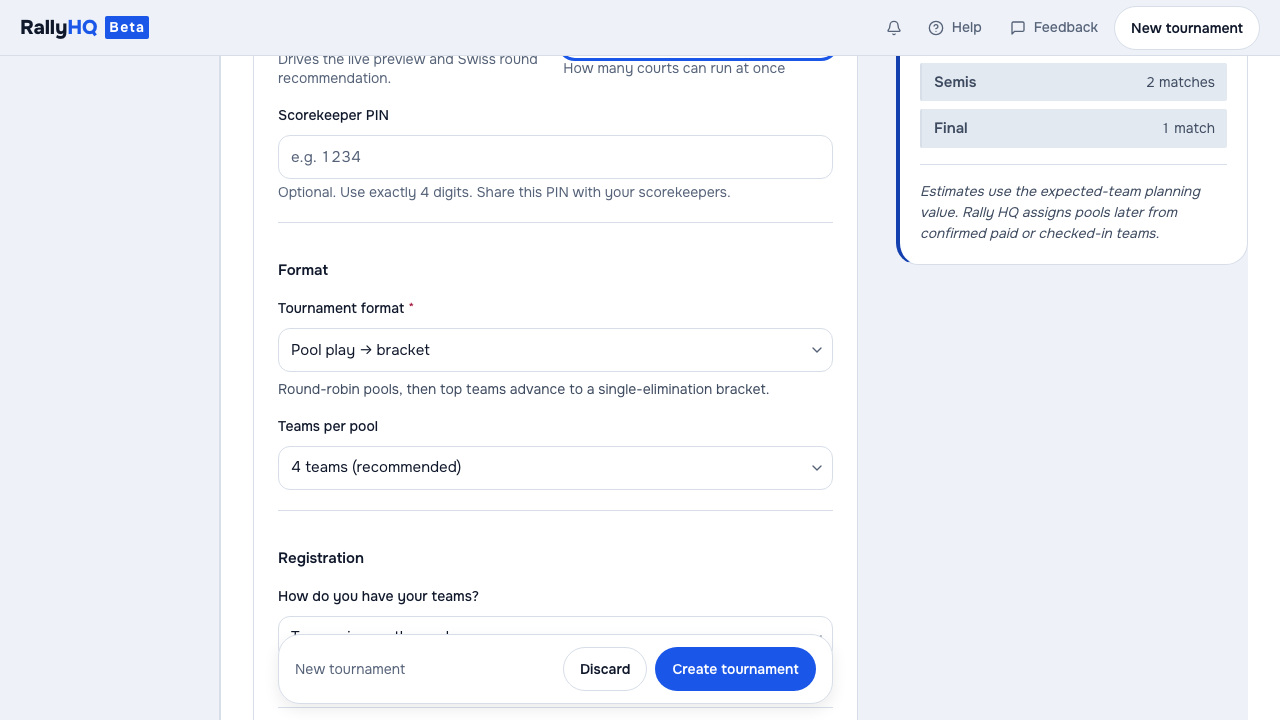
Try the tournament guideA captured staged product frame. It shows a tournament form; it does not show customer activity or a live hosted event.
02 The playable version
The video keeps the path whole
The same staged create-tournament journey is available here as a video with its own controls. It uses the captured stills, captions and target areas from the guide's source. It has no spoken narration; the written steps in the linked guide provide a descriptive alternative.
Synthetic staged tournament. Demonstration footage of the product flow, not user data, customer behavior, or a claim that every path has been validated.
03 The source shape
The guide keeps each teaching step addressable
Agents drive the real app through a staged journey. The capture pauses before each action, saves a clean frame, and records its caption and target area in a manifest—a file describing each teaching step. Render Kit reads that same manifest to build the click-through player and the motion video. A changed explanation has one source to update.
Rally HQ app journey→ frames + captions + target areas
→ one shared manifest
├─ click-through guide
└─ motion video
Show the captured-step evidence
"frame": "step-09.png",
"kind": "select",
"caption": "Choose a format. Single elimination is just a bracket — so the form drops the pool settings entirely.",
"hotspot": { "x": 555, "y": 350, "w": 555, "h": 44 }
04 The reader journeys
Four views begin with four jobs
The catalogue names the reader role before it names the demo. That keeps the teaching surface from pretending every visitor needs the organizer’s setup flow.
OrganizerCreate a tournament
Build a tournament from the dashboard.
OrganizerRun it on game day
Work through pools, scheduling, and scores that update across the event.
CaptainRun your team
Find the team, pool, and results from a phone.
FanFollow it live
See scores and standings without an app or login.
05 The shared catalogue
Labels have one place to come from
Real state first
The product supplies the scene
Frames come from the demonstrated interface, not from a title card or a separately drawn mockup. The guide can point at a choice because the choice existed in the captured journey.
One catalogue
The catalog supplies the reader label
The homepage and static demo gallery both read the same four walkthrough definitions. The catalog holds the role, title, summary, step count, runtime label, and representative frame, so those two surfaces do not need separately authored labels.
This reduces one kind of drift: separate published cards describing the same journey differently. It does not make the capture immutable, prove an identical rebuild, or replace product testing.
06 The evidence boundary
The output teaches one staged path
This establishes a concrete teaching pattern: a product journey can support both a paced, interactive guide and a continuous video while staying attached to the same visible product state and reader-role catalogue.
These are synthetic demonstration journeys, not customer records. Adoption, teaching effectiveness, and production time savings have not been measured. Inspecting the outputs can show whether they explain this path; it cannot establish complete behavior across Rally HQ.
A staged Rally HQ tournament journey becomes both a click-through guide and a playable video. The useful part is not the file conversion; it is keeping the teaching surface attached to real product state and one shared catalogue of reader journeys.
Collection
Applied
Record
A11
Related sessions
0
Working principles
What to carry forward
Capture a real product journey before turning it into teaching material.
Use one named catalogue for the roles and labels shown across demo surfaces.
Treat staged output as a demonstration, not evidence of customer activity or complete validation.
Explicit relationships
Related sessions
No explicit session relationship is recorded. This technique remains available on its own terms.